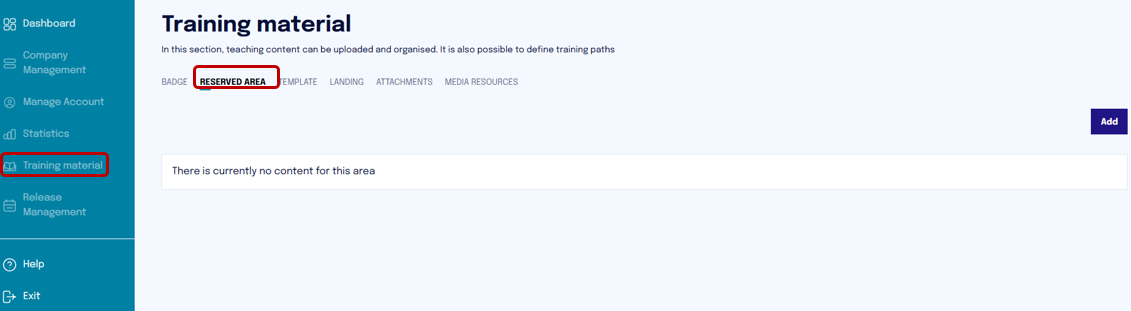
In the "Reserved Area" section, a student has access to resources provided by the company, such as documents or video files.
A person with the role of Company Admin or higher (MSP) has the ability to upload text or video content within the Reserved Area, making it available to all company users. However, they are not authorized to delete content, which must be requested and carried out through the Cyber Guru team (contact support@cyberguru.eu).
To upload content, simply follow these steps:
-
Access the Training Material section.
-
Select the Reserved Area option.
-
Click on Add.
-
Upload the desired content (text or video).
During the upload, you can click on "Click to load" or directly drag and drop files into the designated area ("drag and drop here").
The supported formats are:
Maximum file size: 500 MB
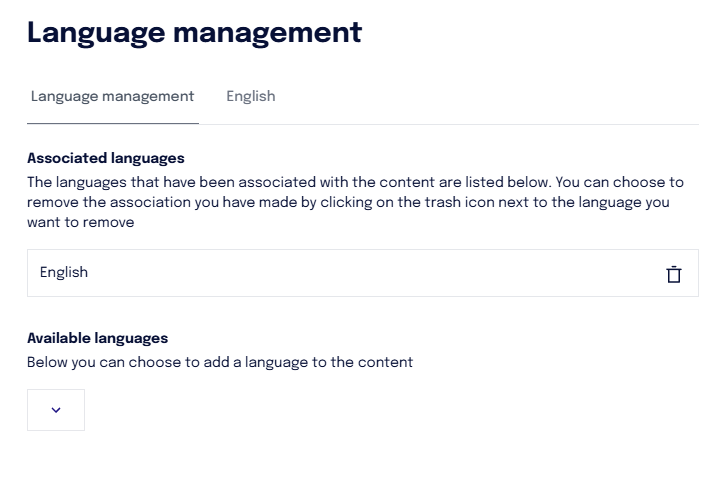
Once the resource is uploaded, you can manage the translation of the title and description.
For example, if a resource is uploaded in English with an English title, you can add the translation of the title and description to make it understandable to Italian-speaking users as well.
This feature allows you to customize the display of information based on the user's language, improving accessibility and content usability.
To do this, simply:
-
Click on the three dots in the "Actions" column.
-
Select the "Language Management" option.
-
Choose the desired language from the "Available Languages" dropdown menu.
-
Proceed with entering the translation of the title and description in the selected language.